

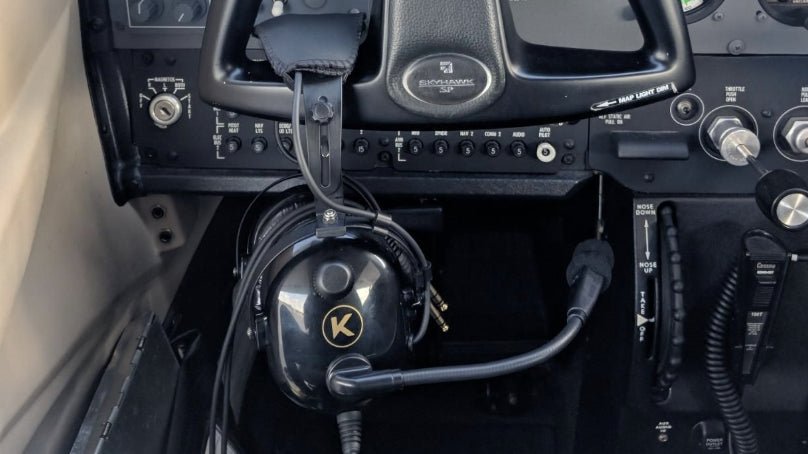
Kore Aviation - If you're new to aviation or just starting flight school, you’ve likely asked, what is a pilot headset and how does it work? It’s more than just a pair of headphones. A pilot headset plays a critical role in cockpit communication, hearing protection, and overall flight safety. Without one, staying in touch with air traffic control or your co-pilot would be a noisy, exhausting challenge.
In this article, we’ll break down exactly how a pilot headset functions, its main components, and why investing in the right model makes all the difference for student and professional pilots alike.
What Is a Pilot Headset?
A pilot headset is a communication device designed for aviation environments. It allows pilots to talk with air traffic controllers (ATC), other aircraft, and passengers through aircraft radios while blocking out engine and wind noise. Unlike standard headphones, aviation headsets are engineered to reduce background noise and include a microphone for two-way communication.
Key Functions of a Pilot Headset
1. Clear Communication With ATC
Aircraft operate in complex airspace controlled by ATC. Pilots must receive and acknowledge instructions during all phases of flight. A pilot headset ensures that instructions are heard clearly and responded to promptly, which enhances both safety and efficiency.
2. Noise Reduction
Cockpits can be loud, especially in propeller aircraft. Headsets reduce constant engine noise using either:
- Passive Noise Reduction (PNR): Uses foam ear cups to block sound naturally.
- Active Noise Reduction (ANR): Adds electronic noise-canceling technology.
3. Protecting Pilot Hearing
Pilots are exposed to high-decibel environments for long periods. A quality headset helps prevent hearing damage and reduces fatigue over time.
4. Comfort for Long Flights
Good headsets provide lightweight materials, soft ear seals, and adjustable bands that make long training or cross-country flights more manageable.
How Does a Pilot Headset Work?
Here’s a breakdown of the core components and their roles:
- Microphone Boom: Allows pilots to speak hands-free. Noise-canceling mics filter out wind and engine noise.
- Ear Cups and Speakers: Deliver crisp audio from radios or intercom systems directly to the ears.
- Noise Reduction Technology: Depending on the model, ANR actively cancels background noise using built-in circuitry.
- Plugs and Connectors: Typically dual GA plugs, or a single LEMO or U174 plug depending on the aircraft type.
- Volume Control: Many headsets let you adjust left/right ear audio separately.
Some premium models also include Bluetooth connectivity to stream audio or receive alerts via apps.
New to flight school? Don’t miss our post on Flying Headset Tips for Beginners to learn how to choose the best model and use it effectively from your first lesson.
Real Benefits for Student Pilots
As a beginner, the benefits of having a reliable headset are massive:
- You hear your instructor clearly, avoiding repeated instructions
- You gain confidence communicating with ATC
- You train with real-world equipment used in licensed flying
- You develop good habits early, including using headsets with checklists and callouts
With a trusted headset, you’re not just buying a device, you’re investing in your learning experience.
What to Look for in a Student Pilot Headset
If you're just starting out, look for these features:
- Lightweight design: Reduces fatigue during long lessons
- Durability: Needs to withstand frequent handling
- Clear Mic Audio: Ensures your instructor and ATC hear you without static
- Affordable Price: You don’t need the most expensive headset to get started
Many flight schools recommend Kore Aviation's KA-1 headset for student pilots. It checks all these boxes.
5 Tips to Maximize Your Pilot Headset Performance
-
Keep It Clean
Wipe the mic and ear cups with a soft cloth after each flight. Sweat and dust can reduce sound quality. -
Adjust Before Takeoff
Test your mic and audio levels during preflight. Confirm both sides are working. -
Use Wind Covers
For open cockpits or loud aircraft, a foam mic cover reduces distortion. -
Store Properly
Use a headset case to prevent cable damage or bending the mic boom. -
Replace Ear Seals Annually
Foam wears out over time. New seals improve comfort and noise reduction.
Real-World Example: Headset in the Cockpit
Imagine you’re in your first solo pattern work session. You hear:
“Cessna 34AB, cleared for takeoff, runway 24, left closed traffic approved.”
Your headset helps you catch every word without struggling over engine noise. You respond confidently:
“Cleared for takeoff, runway 24, left closed traffic, Cessna 34AB.”
That headset just made you sound like a professional pilot.
FAQs: What Is a Pilot Headset and How Does It Work?
-
Can I use regular headphones to fly a plane?
No. Standard headphones lack the mic, connectors, and noise reduction features required for cockpit use. -
What’s the difference between PNR and ANR?
PNR uses foam insulation to block noise. ANR adds electronics to cancel background sounds with a higher price. PNR is the best option for student pilots. -
How much should I spend on a student headset?
Beginner-friendly models like the Kore Aviation P-1 are priced affordably, starting under $200. -
Can I use the same headset in helicopters?
Only if it has a U174 plug. GA plugs won’t fit helicopter audio panels. -
Do all pilot headsets have Bluetooth?
No. Bluetooth is available in select premium models. It’s helpful but not required. -
Is a headset required by the FAA?
Not technically, but it's functionally required for communication with ATC and crew, especially in busy airspace.
Final Thoughts
So now you know the answer to what is a pilot headset and how does it work? It’s more than audio gear. It’s your link to ATC, your defense against hearing loss, and your trusted cockpit companion.
Ready to take off with clarity and confidence? Choose Kore Aviation today for dependable, comfortable, and affordable pilot headsets, especially designed for student pilots.


