
KORE Aviation
Hi There 👋
We are KORE Aviation, feel free to ask us any questions.

Your Recent Orders

GOT A QUESTION

Visit our FAQs for the fastest way to get information.

VIEW FAQs

Product Support

Quick links to help you with your product:

Headset Guide

Your headset may come with either a single or dual volume control located on one or both ear domes. Rotate the knob to adjust the volume to a comfortable level.
If your headset includes a mono/stereo switch located in the Y-block on the main headset cable, select the setting that matches your equipment. Use the stereo position for stereo audio sources. For all other applications, use the mono position. Refer to your aircraft radio or general aviation intercom manual for guidance on the correct setting.
Your headset is equipped with either a full-flex or wire boom that can be bent and positioned for accurate microphone placement. Adjust the boom so the microphone sits at the corner of your mouth, about ⅛ inch from your lips. Do not force the boom past its natural stopping point.
Loosen the oversized thumb nut on the side of the headset by hand. Adjust the headband up or down until the ear domes fit comfortably over your ears. Tighten the thumb nut to lock the position.
Replace the ear seals if they become worn, torn, or hardened over time. To install a new ear seal, insert the lip of the seal into the groove of the ear dome. Hold the dome firmly and keep the top of the ear seal in place while working the lip into the groove around the dome. You may need to pull slightly to ensure the seal fits tightly.
Replace the headband if it becomes worn, torn, or hardened. To replace it, grasp the top liner and gently open the Velcro seam to separate it from the inner strip. Remove the old headband and insert the new one.

General Maintenance

Regular maintenance will help keep your headset performing properly and looking like new.

Do not use harsh chemicals or abrasive cleaners, and do not submerge any part of the headset in water.

Use a clean, damp cloth to gently wipe the ear cups and head pad. For heavily soiled areas, use a mild solution of water and household liquid detergent.

To clean the microphone and plugs, wipe them with a clean cloth lightly dampened with alcohol.

Ear seals and microphone muffs are replaceable and should be changed as needed when they become worn.

Returns & Warranty

Our return policy is 30 days. If 30 days have passed since your purchase, unfortunately we can’t offer a refund or an exchange. To be eligible for a return, the item must be unused and in the same condition that it was received in. It must also be in the original packaging. To complete your return, we require a receipt or proof of purchase from original store.
Once your return is received and inspected, we will send an email to notify that we have received the returned item. If it meets the requirements above, then the refund will be processed, and a credit will automatically be applied to your credit card or original method of payment, within 15 business days.
Please note that banks have different processing time periods. If you haven’t received a refund in 15 business days, please check with the bank as it may still be processing. If you still have not received your refund, please contact us at help@koreheadset.com.
We only replace items if they are defective or damaged. If you need to exchange it for the same item, send us an email at help@koreheadset.com.
Warranty is limited to original purchaser and covers defects in material and workmanship for a period of five (5) years from date of original purchase. Warranty is not valid if our inspection shows that the equipment has been subjected to negligence, misuse or accident, or if it has been tampered with, installed, or altered in any way. All products must be shipped to our address, freight prepaid. Email help@koreheadset.com with a copy of your dated sales receipt and a detailed description of the problem to initiate a claim.
To return your product, please contact us at help@koreheadset.com. You will be responsible for paying for your own shipping costs for returning your item. Shipping costs are non-refundable. If you receive a refund, the cost of return shipping will be deducted from your refund.

UNBOXING VIDEOS

Add an H1 unboxing video in the theme settings.

Send Us a Message

Skip to content

FREE SHIPPING FOR PURCHASES ABOVE $50

Why Do Pilots Wear Headphones? Aviation Essentials Explained - KORE HEADSET LLC
Aviation Headset

Why Do Pilots Wear Headphones? Aviation Essentials Explained

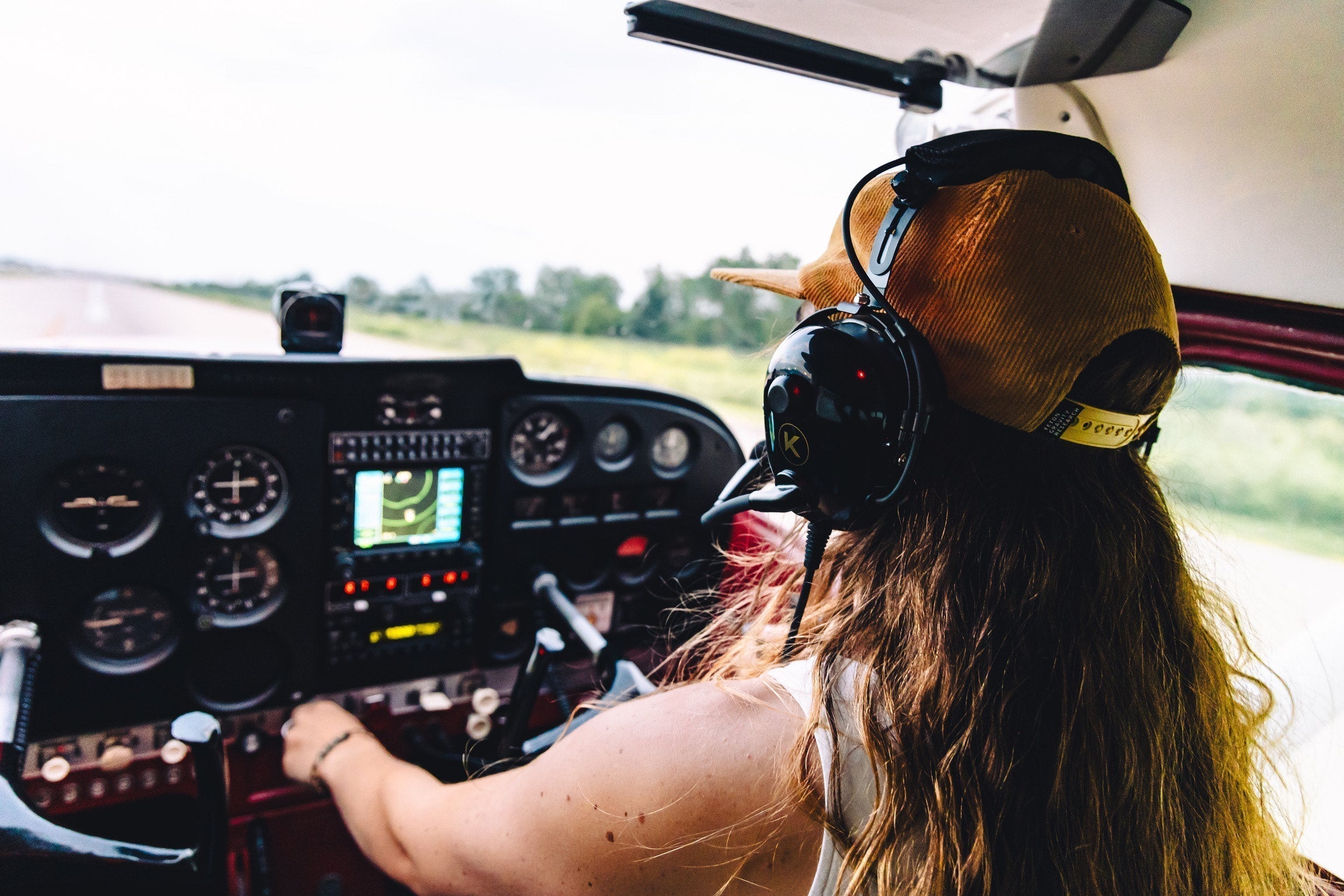
Kore Aviation - Why do pilots wear headphones? It’s a question that comes up often, especially for anyone new to aviation. Those bulky ear-shielding devices are more than style, they are essential gear. Pilots rely on headphones to stay in constant contact with air traffic control, block out engine noise, protect their hearing, and keep fatigue at bay. 

In this guide, we explore why these aviation headsets are essential, what features matter most, and how they differ from consumer audio gear.

1. Clear Communication with Air Traffic Control

To enable two‑way communication with ATC. Standard earphones would be overwhelmed by engine noise and wind, making critical instructions unreadable. Aviation headsets deliver crystal-clear audio from ATC and ensure the pilot’s voice transmits clearly thanks to high‑quality microphones. 

This communication clarity is vital for navigation, managing airspace, and coordinating changes in flight plans.

2. Protecting Hearing from Loud Cockpit Noise

Aircraft cockpits generate noise levels that can exceed 100 decibels. Years of exposure can lead to permanent hearing damage. Pilots wear aviation headsets to greatly reduce this impact. Some headsets use Passive Noise Reduction (PNR), which relies on thick ear seals, while others use Active Noise Reduction (ANR), which cancels out engine noise through electronic processing. 

Discover More: What Is a Pilot Headset and How Does It Work?

3. Reducing Fatigue and Improving Focus

Excessive noise is mentally and physically draining. By lowering ambient noise, headsets help pilots remain focused, reduce stress, and manage workload more effectively on longer flights. Comfort features such as padded ear cups and adjustable headbands further aid in reducing cockpit fatigue. 

4. Comfort and Long-Hour Wear

Student pilots and career aviators spend hours wearing headsets. A pilot’s headset must be lightweight, durable, and comfortable. Modern models like those from Kore Aviation are designed with soft foam seals and ergonomic shapes that stay comfortable even after hours of wearing. 

5. Intercom and Crew Communication

Within the cockpit, pilots need to communicate with co‑pilots and, in larger aircraft, with cabin crew. Aviation headsets allow this through built‑in intercom systems that connect via the aircraft’s audio panel. Unlike standard headphones, aviation headsets maintain clear, hands‑free communication vital for safe coordination. 

5 Key Functions of Pilot Headphones

Here are the most essential benefits summary that answer why do pilots wear headphones?

  1. Crystal clear ATC and crew communication
  2. Hearing protection against prolonged cockpit noise
  3. Improved mental focus and reduced pilot fatigue
  4. Comfort for extended flight training and bouts
  5. Seamless intercom integration and safety coordination

What Features Make Aviation Headphones Unique?

Here are the key features that set them apart with regular headphones:

  • Noise Reduction: Effective ear seals to cut loud cockpit sounds
  • Boom Microphone: Flexible, noise-canceling mic that stays close to the mouth in turbulence
  • Dual Aviation Plugs (or Helicopter Plug): Compatible with aircraft audio jacks
  • Stereo Volume Controls: Adjust left and right audio independently
  • Comfort Design: Lightweight with plush padding to wear for hours without strain

Choose the Right Headset Early. Discover More: Which Aviation Headset Is Right for Beginner Student Pilots?

Common Misconceptions About Headsets

  1. They Are Just for Listening to Music
    Not true. Aviation headsets are communication and protection tools built for the cockpit environment.
  2. All Headsets Are the Same
    Cheap models lack proper noise reduction, mic quality, or durability, and can hinder training progress.
  3. Active Noise Cancellation (ANR) Makes All Others Obsolete
    ANR is great but comes with added weight and cost. Many student pilots do fine with passive models (PNR Headset)

FAQs: Why Do Pilots Wear Headphones?

  1. How long do aviation headsets last?
    With proper care, they can last several years. Many  Kore Aviation users say their headsets last more than five years with regular use. Replace ear seals and cords as needed.
  2. Why don’t pilots wear earbuds?
    Earbuds do not block engine noise, lack mic support, and are unsafe for cockpit use.
  3. Are aviation headphones required?
    Most flight schools require them within the first few lessons for safety and communication.
  4. Can pilots just use normal phones instead?
    No. Aviation headphones are engineered for cockpit noise levels and use proper connectors for intercom and ATC systems
  5. Do aviation headsets protect from explosions or crashes?
    No. They are meant for routine noise protection. They are not impact or explosion shields.
  6. Do all pilots own their own headset?
    Not necessarily. Flight schools may provide basic models. Many pilots invest in personal headsets for comfort and performance.
  7. Do I need ANR for student training?
    Not always. PNR models are common for student pilots for their cost and simplicity like the Kore KA‑1, they provide enough noise reduction for training.
  8. Can long-term use of headsets harm hearing?
    No. Proper aviation headsets protect hearing from cockpit noise. They reduce exposure to sound rather than add harmful volume.
  9. Do pilots wear them throughout the entire flight?
    Typically yes, especially during takeoff, climb, and approach. Some remove them when on the ground or when not required.

Final Thoughts 

So when you ask, why do pilots wear headphones?, the answer is simple: aviation headsets are critical tools for hearing protection, clear communication, and pilot comfort. The right headset lets learners focus on flying rather than noise.

Ready to train with clarity and confidence? Browse Kore Aviation’s student pilot headsets today and find the perfect fit for your cockpit needs.

Pilot gear trusted by 50,000+ pilots

Ready to upgrade your aviation headset?

The KORE Aviation KA-1 is our best-selling aviation headset, trusted by student pilots, instructors, passengers, and flight schools for its comfort, clear communication, and dependable everyday performance.

GET 15% OFF + FREE SHIPPING
KORE Aviation KA-1 pilot headset
Tiara Shafira profile picture

ABOUT THE AUTHOR

Tiara Shafira

Tiara Shafira is KORE Aviation's Digital Marketing Manager, overseeing SEO strategy and blog content. She works directly with flight schools and pilot communities to make sure student pilots get straight answers about what gear they actually need.

KORE Aviation
Hi There 👋
We are KORE Aviation, feel free to ask us any questions.

Your Recent Orders

GOT A QUESTION

Visit our FAQs for the fastest way to get information.

VIEW FAQs

Product Support

Quick links to help you with your product:

Headset Guide

Your headset may come with either a single or dual volume control located on one or both ear domes. Rotate the knob to adjust the volume to a comfortable level.
If your headset includes a mono/stereo switch located in the Y-block on the main headset cable, select the setting that matches your equipment. Use the stereo position for stereo audio sources. For all other applications, use the mono position. Refer to your aircraft radio or general aviation intercom manual for guidance on the correct setting.
Your headset is equipped with either a full-flex or wire boom that can be bent and positioned for accurate microphone placement. Adjust the boom so the microphone sits at the corner of your mouth, about ⅛ inch from your lips. Do not force the boom past its natural stopping point.
Loosen the oversized thumb nut on the side of the headset by hand. Adjust the headband up or down until the ear domes fit comfortably over your ears. Tighten the thumb nut to lock the position.
Replace the ear seals if they become worn, torn, or hardened over time. To install a new ear seal, insert the lip of the seal into the groove of the ear dome. Hold the dome firmly and keep the top of the ear seal in place while working the lip into the groove around the dome. You may need to pull slightly to ensure the seal fits tightly.
Replace the headband if it becomes worn, torn, or hardened. To replace it, grasp the top liner and gently open the Velcro seam to separate it from the inner strip. Remove the old headband and insert the new one.

General Maintenance

Regular maintenance will help keep your headset performing properly and looking like new.

Do not use harsh chemicals or abrasive cleaners, and do not submerge any part of the headset in water.

Use a clean, damp cloth to gently wipe the ear cups and head pad. For heavily soiled areas, use a mild solution of water and household liquid detergent.

To clean the microphone and plugs, wipe them with a clean cloth lightly dampened with alcohol.

Ear seals and microphone muffs are replaceable and should be changed as needed when they become worn.

Returns & Warranty

Our return policy is 30 days. If 30 days have passed since your purchase, unfortunately we can’t offer a refund or an exchange. To be eligible for a return, the item must be unused and in the same condition that it was received in. It must also be in the original packaging. To complete your return, we require a receipt or proof of purchase from original store.
Once your return is received and inspected, we will send an email to notify that we have received the returned item. If it meets the requirements above, then the refund will be processed, and a credit will automatically be applied to your credit card or original method of payment, within 15 business days.
Please note that banks have different processing time periods. If you haven’t received a refund in 15 business days, please check with the bank as it may still be processing. If you still have not received your refund, please contact us at help@koreheadset.com.
We only replace items if they are defective or damaged. If you need to exchange it for the same item, send us an email at help@koreheadset.com.
Warranty is limited to original purchaser and covers defects in material and workmanship for a period of five (5) years from date of original purchase. Warranty is not valid if our inspection shows that the equipment has been subjected to negligence, misuse or accident, or if it has been tampered with, installed, or altered in any way. All products must be shipped to our address, freight prepaid. Email help@koreheadset.com with a copy of your dated sales receipt and a detailed description of the problem to initiate a claim.
To return your product, please contact us at help@koreheadset.com. You will be responsible for paying for your own shipping costs for returning your item. Shipping costs are non-refundable. If you receive a refund, the cost of return shipping will be deducted from your refund.

UNBOXING VIDEOS

Add an H1 unboxing video in the theme settings.

Send Us a Message