

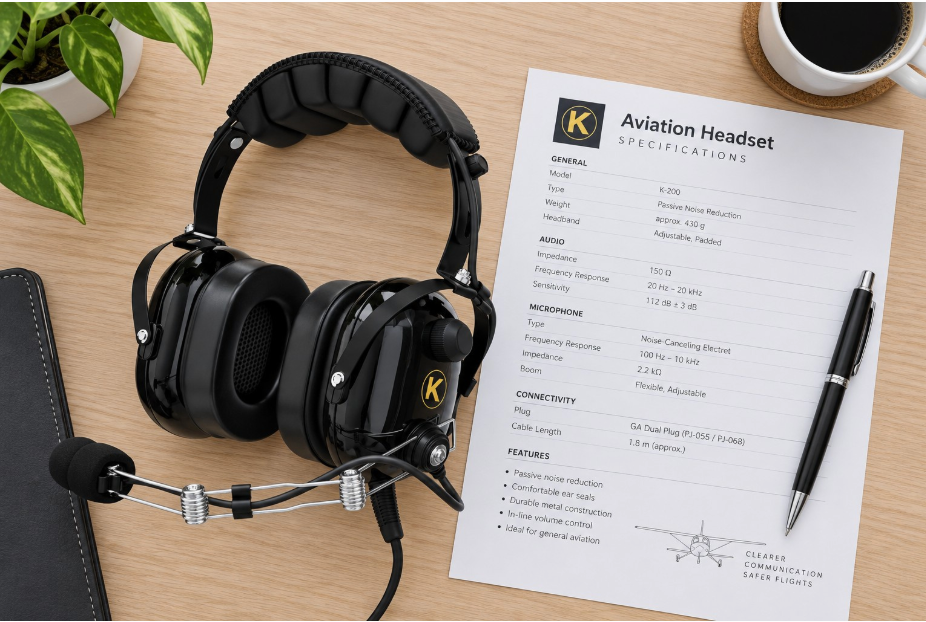
KORE Aviation - Shopping for pilot gear can quickly become overwhelming when every manufacturer claims their equipment is the quietest, lightest, and most comfortable model on the market. Evaluating aviation headset specs requires looking at hard data rather than glossy advertising copy. When you sit down with a manufacturer datasheet, mastering aviation headset specs helps you identify which numbers matter for cockpit safety, radio clarity, and hearing preservation. Over 30,000 pilots trust KORE equipment because transparent engineering beats marketing hype every single time.
Understanding Noise Reduction and Aviation Headset NRR
The single most scrutinized metric within any set of aviation headset specs is the noise reduction rating. When examining aviation headset NRR, you are looking at laboratory test results that measure how many decibels of sound the earmuffs block out across various frequencies. In a typical Cessna 172 cockpit, engine and wind noise at cruise altitude hover between 85 and 95 dB, while pre-flight run-ups can spike past 100 dB. According to OSHA and NIOSH standards, unprotected exposure to 95 dB for more than a couple of hours causes cumulative hearing damage. The FAA notes that pilots flying more than three hours per week face serious long-term hearing risks without proper attenuation.
A quality passive noise reduction headset achieves an NRR of around 20 to 24 dB. For instance, the KORE KA-1 and the budget-friendly KORE P1 both deliver 24 dB of passive protection. Buyers should remember that lab tests occur in sterile acoustic chambers. Real-world reduction in a vibrating cockpit with glasses frames breaking the ear seal is slightly lower than laboratory ratings. Furthermore, be cautious of manufacturers who add passive NRR figures and active noise cancellation figures together into a single inflated number. Passive and active suppression work differently, and combining them misrepresents actual cockpit attenuation.

Impedance and Audio Clarity in Headset Specs
Radio communication depends heavily on electrical matching between your comm panel and your audio gear. Reviewing headset impedance aviation data within your aviation headset specs prevents frustrating audio issues like weak volume or severe distortion. Standard aviation headsets typically feature microphone impedances designed to match standard aircraft intercom systems. Electret microphones require DC bias voltage supplied by the panel through the microphone plug, while dynamic microphones operate passively with moving coils.
If you connect a low-impedance military dynamic microphone to a general aviation intercom designed for powered electret elements, your transmissions will sound weak or unintelligible. Always check the spec sheet for electret versus dynamic microphone classifications to ensure your equipment matches your aircraft panel. Volume controls built into the earcup also affect impedance slightly as resistance changes, but a matched system guarantees crisp radio calls and clear ATC instructions.
Aviation Headset Weight and Clamping Force Factors
Physical fatigue during cross-country flights is heavily influenced by gram weight and headband tension. Evaluating aviation headset weight listed in your aviation headset specs is essential because every single ounce compounds over a three-hour journey. Entry-level and mid-range passive headsets typically weigh between 14 and 18 ounces. While heavier materials offer durability, excessive weight creates pressure points on the crown of the head.
Clamping force represents the actual physical squeeze exerted by the headband. Traditional aviation headsets apply roughly 6 to 7 newtons of force to create an airtight acoustic seal around the ears. In contrast, consumer music headphones only exert about 3.5 to 4 newtons. That extra squeeze is necessary in aviation to block high engine decibels, but it requires careful distribution. Paired with ultra-plush silicone gel ear seals or textured gel seals that conform around glasses frames, proper clamping force eliminates hot spots and ear fatigue.

How to Compare Aviation Headsets Using Plugs and Seals
Learning how to compare aviation headsets means examining the hardware interfaces outlined in aviation headset specs that connect you to the aircraft. Plug configurations vary by aircraft type. General aviation fixed-wing aircraft use dual GA plugs, specifically the PJ-055 microphone plug and the PJ-068 headphone plug. Helicopters and rotorcraft require a single U-174 plug, found on models like the KORE H1. Advanced glass panels in high-performance aircraft may utilize LEMO 6-pin connectors for panel-powered active systems.
Ear seal construction is another critical line item on the datasheet. Cheap foam seals degrade quickly and leak low-frequency noise. Premium silicone gel ear seals distribute pressure evenly and create a superior acoustic barrier. Always verify whether the ear seals are replaceable and whether accessories like washable cloth ear covers are available to extend lifespan during hot summer flying seasons.

Comparing Aviation Headset Specs Across Entry and Mid-Range Models
When analyzing aviation headset specs across different market tiers, a structured comparison helps clarify what you are getting for your money. Premium ANR units can cost upwards of one thousand dollars, but reliable passive models deliver exceptional protection at a fraction of the cost.
| Specification Feature | Good Value Standard | Red Flag Warning |
|---|---|---|
| Passive NRR | 20 to 24 dB | Under 18 dB or missing lab data |
| Weight | 14 to 18 ounces | Over 22 ounces without counterbalancing |
| Clamping Force | 6 to 7 Newtons | Under 4 N (poor seal) or over 9 N (headaches) |
| Ear Seal Material | Silicone Gel or Memory Foam | Stiff vinyl over hard foam |
| Warranty Length | 1 to 5 Years | 90-day limited warranty or final sale |
| KORE KA-1 Model | 24 dB PNR, Gel Seals, 5-Year Warranty | N/A (Verified high value) |
| KORE P1 Model | 24 dB PNR, Dual GA Plugs, 1-Year Warranty | N/A (Verified student value) |
Investing in pilot gear requires balancing upfront cost with long-term durability. If you fly regularly with flight school partners or private aircraft, purchasing a proven passive model provides robust hearing protection without paying for complex electronics that can fail over time.
Frequently Asked Questions
1. What is the difference between passive noise reduction and active noise reduction on a spec sheet?
Passive noise reduction relies entirely on physical earmuff design, dense acoustic foam, and gel ear seals to block sound waves. Active noise reduction uses electronic microphones and speakers inside the ear cup to generate inverse sound waves that cancel out low-frequency engine hum. All KORE headsets utilize high-efficiency passive noise reduction to deliver reliable protection without relying on batteries.
2. Why do aviation headsets feel so tight compared to normal headphones?
Cockpit noise levels in aircraft like a Cessna 172 reach 85 to 95 dB during cruise flight. To achieve a true acoustic seal that blocks this ambient roar, aviation headsets require a clamping force of 6 to 7 newtons. Consumer music headphones typically exert only 3.5 to 4 newtons, which would let dangerous cockpit noise leak straight through the ear seal.
3. Can I use a general aviation dual plug headset in a helicopter?
No, standard fixed-wing aircraft use dual GA plugs consisting of a PJ-055 microphone plug and a PJ-068 headphone plug. Helicopters and rotorcraft require a single U-174 plug. Attempting to connect a fixed-wing headset to a helicopter panel requires a specialized adapter, or you can purchase a dedicated helicopter model like the KORE H1.
4. How often should aviation headset ear seals be replaced?
Ear seals should typically be inspected every six to twelve months and replaced when they lose their pliability, crack, or develop punctures. Worn ear seals compromise the acoustic seal, allowing cockpit noise to leak into your ears and increasing headband discomfort. Upgrading to silicone gel seals significantly improves comfort on long cross-country flights.
5. What does a five-year manufacturer warranty signal about headset quality?
A multi-year warranty indicates that the manufacturer uses durable materials, robust wiring harnesses, and high-grade plastics designed to withstand the harsh environment of active flight schools and daily pilot use. Entry-level gear often carries a shorter one-year warranty, while premium models back their hardware with extended five-year coverage.
Bottom Line
Understanding aviation headset specs makes it easier to separate useful features from marketing claims. Start with the numbers and details that affect everyday flying: noise reduction, headset weight, microphone compatibility, plug type, ear seal material, comfort, and warranty coverage.
For student and GA pilots choosing a passive headset, models such as the KORE KA-1 and KORE P1 provide 24 dB PNR at different price points, while the KA-1 adds gel ear seals and a longer 5-year warranty.
Most importantly, compare specifications in the context of your aircraft and how often you fly. The best headset on paper is not necessarily the best one for your cockpit. Compatibility, fit, comfort, and reliable communication matter just as much as the numbers on the spec sheet.


