

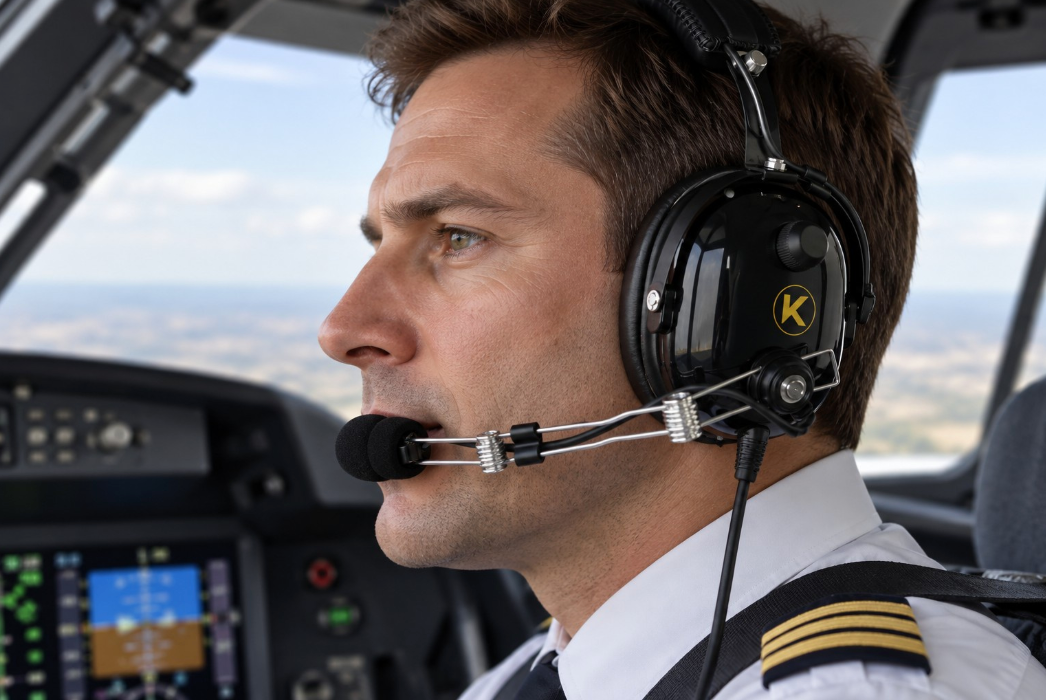
KORE Aviation - When you transmit on CTAF or approach control, the component everyone on the frequency hears is your aviation headset microphone. If your audio is weak, muffled, or distorted, air traffic control cannot understand your position reports, and your flight instructor cannot hear your callouts over the 85 to 95 decibels of cockpit noise in a Cessna 172. Understanding how your aviation headset microphone works, how to position it, and how to troubleshoot common audio failures will save you from embarrassing radio callbacks and safety hazards.
Understanding Aviation Headset Microphone Types
Before troubleshooting a transmission issue, you need to understand the hardware inside your boom arm. The audio industry uses two primary electrical configurations for aviation applications. Comparing electret vs dynamic mic aviation setups reveals why hardware mismatching causes total radio failure.
Modern general aviation headsets almost exclusively use electret microphones. An electret microphone contains a miniature condenser element with a built-in field effect transistor amplifier. Because of this internal active circuitry, electret elements require a direct current bias voltage, typically 8 to 12 volts supplied directly by the aircraft audio panel or radio through the microphone jack. When power is present, the electret aviation headset microphone generates a crisp, high-output signal that modern avionics process easily.
Dynamic microphones operate on a completely different physical principle. They use a moving coil attached to a diaphragm inside a magnetic field. As acoustic sound waves strike the diaphragm, the coil moves and generates electrical current through electromagnetic induction. Dynamic microphones do not require any external electrical bias voltage or panel power. You find dynamic microphones primarily in older general aviation installations, military surplus aircraft, and specialized turbine rotorcraft setups.
If you install a dynamic microphone into an aircraft panel designed exclusively for unpowered or differently wired systems, or if you plug an electret aviation headset microphone into an unpowered military installation, you will experience either complete silence or extremely weak, unintelligible audio. Matching your headset to your aircraft electrical standard is the foundational step of clean radio communication.

Aviation Headset Mic Positioning and Noise Cancellation
Even with the correct microphone type installed, proper aviation headset mic positioning remains the single most frequent reason pilots experience complaints from controllers. If your transmissions sound distant or weak, your aviation headset microphone is almost certainly parked too far away from your mouth.
Aviation microphones are almost universally noise-cancelling gradient microphones. They feature two acoustic ports. The front port faces your mouth to capture your voice, while the rear port faces away into the cockpit to capture ambient cabin noise like engine roar, propeller whine, and windrush. The internal circuitry compares the two signals and cancels out any sound that hits both ports equally. This phase cancellation successfully strips out the 90 decibels of continuous background noise found during a standard aircraft run-up.
However, this noise-cancelling design creates a strict physical requirement. Because the sound pressure level of your voice drops off exponentially with distance, the microphone must be extremely close to your mouth for your voice to register louder than the cockpit background noise.
The correct positioning guidance is simple and non-negotiable. The aviation headset microphone element should sit about one eighth of an inch from the corner of your lips, touching or nearly touching. The talk side of the microphone must face directly toward your mouth. If you pull the boom arm two inches away from your face, your voice level drops below the threshold required to trigger the squelch circuit properly, resulting in a weak or chopped-off transmission.
The Critical Role of the Microphone Windscreen
Many pilots make the mistake of removing the foam windscreen from their aviation headset microphone, assuming it looks cleaner or makes no difference. In reality, removing the windscreen degrades your audio quality immediately.
The foam windscreen serves three vital acoustic functions. First, it acts as a mechanical barrier against plosive breath bursts. When you pronounce hard consonants like P, B, or T, a rush of air leaves your mouth. Without foam to diffuse that kinetic blast, the air strikes the delicate microphone diaphragm directly, creating a loud popping sound that overmodulates the radio receiver.
Second, the windscreen breaks up turbulence caused by cabin ventilation vents and drafty side windows. Third, it provides a stable boundary layer of still air directly around the microphone capsule, preventing windrush noise from entering the rear and front acoustic ports. Never fly without your foam windscreen intact on your aviation headset microphone.

Troubleshooting Weak, Muffled, or Dead Audio
When a pilot reports that their pilot headset mic not working correctly, troubleshooting requires a systematic checklist. Do not start replacing expensive avionics until you run through these physical and electrical checks.
- Check microphone side orientation: Many noise-cancelling microphones have a distinct front and back. If the aviation headset microphone is rotated 180 degrees so the talk side faces the cockpit wall instead of your mouth, the noise-cancelling circuit will actively cancel your voice while amplifying cabin noise. Look for the small white dot or talk indicator label and ensure it points at your lips.
- Verify physical positioning: Confirm that the boom arm has not slipped and that the aviation headset microphone rests one eighth of an inch from your mouth. Move it closer before suspecting electrical failure.
- Inspect plug seating: Dual general aviation plugs (PJ-055 for the microphone and PJ-068 for the audio) must be pushed completely home into the aircraft jacks. A partially seated microphone plug will make intermittent contact, resulting in static, dropped words, or complete transmission failure.
- Check panel mic gain settings: Modern audio panels and glass flight deck displays feature software adjustable microphone gain settings. If the gain is set too low, even a properly positioned aviation headset microphone will transmit weak audio. Consult your avionics manual to verify the gain level.
- Isolate the headset versus the aircraft: Plug a second known working headset into your seat jack. If the second headset also transmits weak audio, the problem lies in the aircraft audio panel, radio wiring, or push-to-talk switch. If the second headset works perfectly, your primary headset has an internal wiring or component fault.
- Inspect cable strain relief: Examine the microphone boom wire where it enters the ear cup and the main down-lead cable where it exits the strain relief boot. Repeated flexing during storage and preflight can fatigue internal copper strands, leading to intermittent audio dropouts.
How to Sound Better on the Radio
Hardware is only half the equation. Microphone technique dictates whether you sound like a professional commercial pilot or an amateur fumbling through a checkride. Follow these three rules every time you key the mic.
First, talk across the microphone rather than screaming directly into it. Overmodulating the radio by shouting distorts your voice, making it completely unintelligible to air traffic control. Speak in a normal, conversational tone of voice.
Second, pause for a fraction of a second after pressing your push-to-talk switch before you start speaking. Some aircraft radios and relay switches take a millisecond to engage the transmitter carrier wave. If you start speaking the exact microsecond you press the button, the first syllable of your callsign gets clipped off.
Third, enunciate clearly and keep your transmission concise. Clear mic technique combined with a reliable aviation headset ensures your safety in crowded controlled airspace.
Choosing the Right Headset for Reliable Audio
If you are tired of dealing with intermittent audio failures, static, and cheap rental gear, investing in a dependable passive noise reduction headset is the smartest move for any student or private pilot. KORE Aviation offers purpose-built flight gear trusted by over 30,000 pilots and more than 50 flight school partners nationwide.
For standard fixed-wing training and cross-country flying, the KORE KA-1 General Aviation Headset delivers 24 decibels of passive noise reduction, plush silicone gel ear seals, switchable mono and stereo capability, an integrated 3.5mm AUX input for flight tracking apps, and a complete 5-year warranty for $224.95. If you need a reliable backup headset or a budget-friendly primary option, the KORE P1 General Aviation Headset provides the same 24 decibels of PNR protection and dual GA plugs for $124.95 with a 1-year warranty. Rotorcraft pilots can rely on the KORE H1 Helicopter Pilot Headset, featuring a U-174 single plug and identical acoustic performance for $224.95.
| Model | Plug Type | Noise Reduction | Warranty | Price |
|---|---|---|---|---|
| KORE KA-1 Headset | Dual GA (PJ-055 / PJ-068) | 24 dB PNR | 5 Years | $224.95 |
| KORE P1 Headset | Dual GA (PJ-055 / PJ-068) | 24 dB PNR | 1 Year | $124.95 |
| KORE H1 Helicopter Headset | U-174 Single Plug | 24 dB PNR | 5 Years | $224.95 |

Frequently Asked Questions
1. Why do other pilots say my transmissions sound muffled?
Muffled audio usually happens because the aviation headset microphone is positioned too far away from your mouth, or the foam windscreen is degraded and trapping moisture. Move the microphone until it touches or nearly touches the corner of your lips, and replace worn foam windscreens immediately.
2. What is the difference between electret and dynamic aviation microphones?
Electret microphones contain active internal electronics and require a direct current bias voltage supplied by the aircraft radio panel. Dynamic microphones operate via electromagnetic induction using a moving coil and do not require external power. Modern general aviation aircraft use electret microphones exclusively.
3. How close should my aviation headset microphone be?
The aviation headset microphone must sit about one eighth of an inch from the corner of your lips. Parking the microphone two inches away drops your voice signal below the noise cancellation threshold and results in weak, unintelligible radio calls.
4. Can I use a helicopter headset in a fixed-wing airplane?
Helicopter headsets use a single U-174 plug and are wired differently than fixed-wing aircraft that require dual GA plugs. While impedance converters exist, plugging a helicopter headset directly into a Cessna or Piper panel without an adapter will result in no audio transmission.
5. Why does my microphone transmit loud static when I touch the boom arm?
Loud static or cutting out when you adjust the boom arm usually indicates a worn cable strain relief boot or a loose microphone plug jack connection. Inspect the cable for internal wire fatigue where it enters the ear cup.
Bottom Line
A properly functioning aviation headset microphone is essential for clear communication with ATC, instructors, and other pilots. Even a high-quality headset can produce weak or muffled transmissions if the microphone is positioned incorrectly, the windscreen is damaged, or the connections are loose.
Before assuming your headset needs replacing, check the microphone's position and orientation, inspect the plugs and cables, and test your audio settings. Understanding the difference between electret and dynamic microphones can also help you avoid compatibility problems with your aircraft.
If you're looking for a dependable headset, KORE Aviation offers options for different flying needs, including the KA-1 and P1 for compatible fixed-wing aircraft and the H1 for helicopter audio systems.
Ultimately, clear radio communication starts with the right equipment, proper microphone positioning, and good speaking habits. A few simple checks before every flight can help you avoid communication problems when clarity matters most.


