

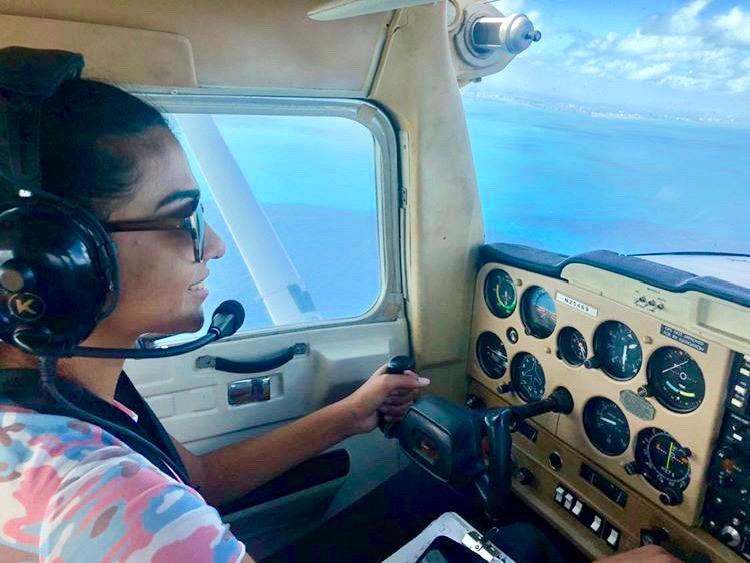
Kore Aviation - Many pilots wear glasses. Some need them for distance vision. Others use them for reading charts, instruments, or electronic flight displays. Yet wearing glasses with aviation headsets often creates discomfort that pilots quietly tolerate.
Pressure on the temples. Headaches after long flights. Broken ear seals that let engine noise leak in. These problems are common and frustrating. That is why understanding wearing glasses with aviation headsets matters more than most pilots realize.
A headset should protect your hearing, improve communication, and help you stay focused. If it causes pain or distraction, it works against you. In this article, you will learn how to choose a headset that fits comfortably with glasses, what design features matter most, and which headset options work best for glasses wearers pilots.
Why Wearing Glasses with Aviation Headsets Can Be Uncomfortable
Wearing glasses with aviation headsets creates a unique fit challenge. Headsets are designed to seal around the ears. Glasses add an extra object between the ear seal and your head.
This creates three common problems.
- First is pressure. The clamping force of the headset pushes the glasses arms into the side of your head. Over time, this causes soreness and headaches.
- Second is seal loss. When glasses arms break the seal, noise reduction drops. Engine and wind noise leak into the ear cup, reducing clarity and increasing fatigue.
- Third is uneven fit. Glasses arms often cause one side to seal better than the other, which leads to uneven audio and discomfort.
These issues explain why many pilots search for the best aviation headset for glasses wearers instead of just buying the most popular model.
Why Comfort Matters More Than You Think in the Cockpit
Comfort is not a luxury in aviation. It directly affects safety.
Discomfort distracts attention from instruments, radios, and visual scanning. Noise leakage increases fatigue and stress. Over long flights, poor headset comfort can lead to headaches that reduce decision making quality.
Wearing glasses with aviation headsets should feel natural, not like something you tolerate. When the headset fits properly, you forget it is there. That is the goal.
Wearing Glasses with Aviation Headsets: How to Choose and Find a Comfortable Fit
Choosing the right headset starts with understanding how design interacts with eyewear.
1. Ear Seal Material Is Critical
Soft ear seals matter most. Silicone gel or memory foam cushions conform around glasses arms instead of pressing against them. This reduces pressure points and preserves the noise seal.
2. Clamp Pressure Should Be Moderate
A headset does not need excessive clamping force to stay in place. Moderate clamp pressure spreads force evenly across the head instead of concentrating it at the temples.
3. Headset Weight Affects Fatigue
Heavier headsets amplify discomfort when combined with glasses. Lighter designs reduce long term strain, especially during training flights or cross country trips.
Best Aviation Headset Features for Glasses Wearers
When evaluating headset options for glasses wearers pilots, look for these features.
| Feature | Why It Helps Glasses Wearers |
|---|---|
| Soft gel ear seals | Reduce pressure and seal around frames |
| Moderate clamp force | Prevents temple pain |
| Lightweight frame | Reduces fatigue |
| Adjustable headband | Custom fit for head shape |
| Dual volume control | Compensates for seal differences |
| Passive noise reduction | Less pressure than heavy ANR systems |
The best aviation headset for glasses wearers focuses on fit before advanced electronics.
Why Kore Aviation KA‑1 Works Well for Glasses Wearers
For pilots who wear glasses or sunglasses regularly, the Kore Aviation KA-1 headset checks these boxes in a practical way and is commonly regarded as one of the best aviation headsets for pilots who wear glasses.

Choosing a Headset — Step by Step Guide for Glasses Wearers
Here is a practical checklist to pick the best aviation headset for glasses wearers:
- Test with your own glasses — bring them when shopping.
- Check ear seal type — gel or dense memory foam is best for eyesight comfort.
- Verify clamp pressure — moderate clamp reduces frame pressure and hotspots.
- Check noise reduction rating (NRR) — at least 22 dB for passive.
- Ensure stereo or mono support plus AUX input — gives flexibility across aircraft.
- Consider headset weight and adjustability — lighter headsets reduce fatigue.
- Plan for long flights — look for replaceable cushions and headband comfort.
- Evaluate price to performance — you do not always need premium price if fit and seal are great.
- Check maintenance options — replaceable seals matter long term.
- Buy from trusted manufacturer — support, warranty, spare parts matter over years of use.
Pro Tip: Always look for a headset with adjustable features. Everyone’s head shape is different, and what works for someone else might not suit you.
This approach balances comfort, safety and value for pilots who wear glasses or sunglasses.
Practical Tips for Using Headsets with Glasses
Choosing a good headset is important. Using it right matters too. Here are some best practices for pilots who wear glasses.
-
Adjust the headband carefully
Don’t tighten the headband too much. A good seal does not require maximum clamp. Loosen just enough for a stable fit. -
Use soft or gel ear seals
If you have a headset with foam pads, consider replacing them with gel seals. They cushion glasses arms better and reduce hotspots. -
Use adjustable boom mic
Position the mic so it does not press glasses against your head. -
Check audio before flight
Test stereo audio and adjust volume before taxi so you are comfortable from the start. -
Take breaks on long flights
If pressure builds, remove or adjust ear cups a little. This helps prevent discomfort. -
Consider sunglasses compatibility if flying in bright conditions
Some headsets fit comfortably over sunglasses frames. If you fly in bright sun often, this is worth checking when you test the headset.
These simple habits can make the difference between a painful flight and a comfortable, clear one.
Read More: How to Comfortably Wear Headphones with Glasses: Key Tips for Long Sessions
Common Mistakes Glasses-Wearing Pilots Make (And How to Avoid Them)
- Choosing a headset only based on brand or price, without testing with glasses — leads to discomfort or poor seal.
- Overlooking ear pad material — hard or thin ear cups cause pressure points.
- Ignoring maintenance — old seals compress and lose effectiveness over time.
- Relying solely on passive noise reduction in noisy aircraft — poor seal worsens hearing exposure.
- Wearing heavy glasses frames — thick temples push awkwardly under seals.
Avoiding these mistakes makes a big difference in comfort, hearing protection and long term headset performance.
Also read: Why Do Aviation Headsets Have Two Plugs?
Maintenance Tips to Preserve Comfort
Replace ear seals yearly. Clean cushions regularly. Store headsets in a protective bag. Worn seals become stiff and worsen pressure on glasses arms.
The Kore Aviation KA‑1 includes a headset bag, which helps preserve cushion softness and long term comfort.
More Details: How to Maintain Your Aviation Headset for Long Life & Clear Communication?
What Happens When the Seal Breaks
A broken seal increases cockpit noise exposure. This leads to fatigue, missed radio calls, and long term hearing risk.
That is why choosing a headset that works with glasses is not about comfort alone. It is about safety.
Frequently Asked Questions
-
What is the best aviation headset for glasses wearers?
The best aviation headset for glasses wearers uses soft ear seals, moderate clamp pressure, and a lightweight design. The Kore Aviation KA-1 headset checks these boxes in a practical way and is widely considered one of the best aviation headsets for glasses wearers. -
Can I wear sunglasses with aviation headsets?
Yes. Choose thin frame sunglasses and headsets with flexible ear cushions. -
Why do some headsets hurt more with glasses?
Tight clamp pressure and stiff ear seals push glasses arms into the head. -
Is passive noise reduction better for glasses wearers?
Often yes. Passive headsets are lighter and less aggressive on ear seals. -
Does headset weight matter?
Yes. Heavier headsets increase pressure and fatigue when combined with glasses. -
Are student pilots better off with lighter headsets?
Yes. Comfort and simplicity matter more during training.
Final Thoughts
If you wear glasses or sunglasses while flying, your headset should work with you, not against you. Comfort improves focus, communication, and safety.
Explore comfortable and practical headset options from Kore Aviation, including the KA‑1, and find a setup that fits your vision and your flying style.


