

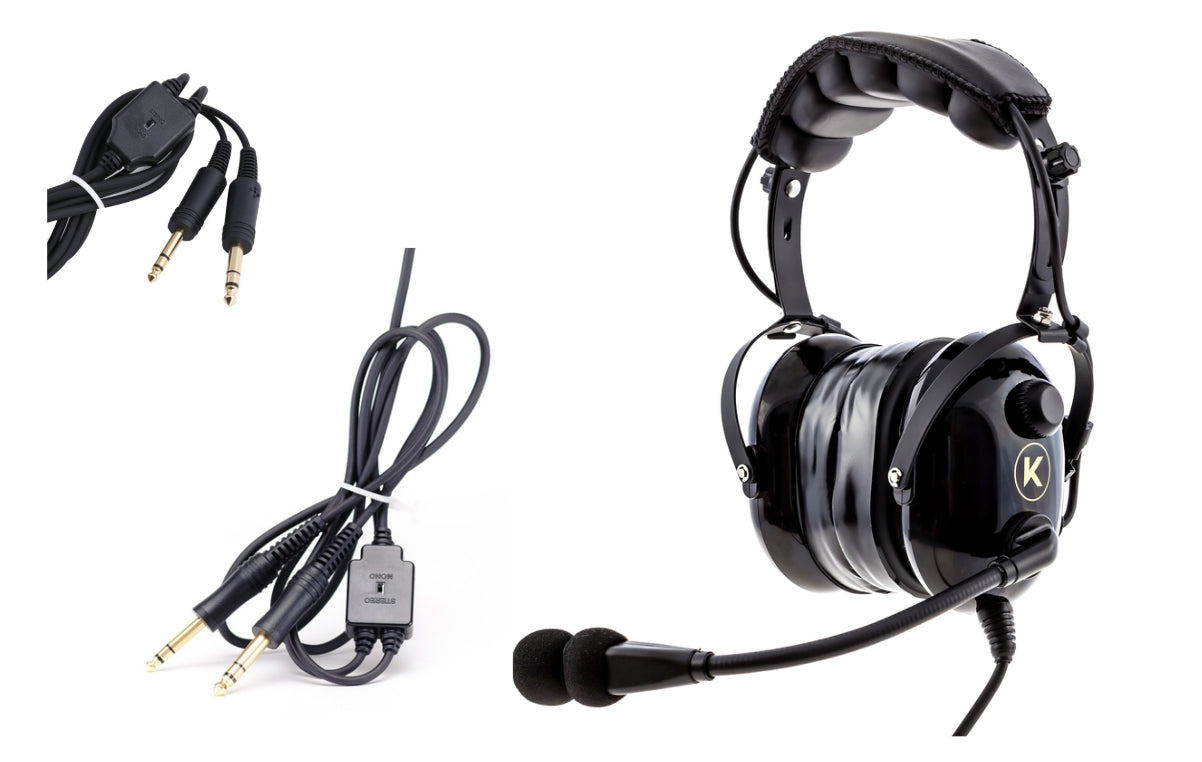
Kore Aviation - If you are new to aviation or upgrading your gear, you might ask: why do aviation headsets have two plugs? Right from first glance, the dual‑plug design looks odd compared to everyday headphones. But in the cockpit, the dual plug setup is deliberate and functional.
In this article, we’ll dive into a clear understanding of why dual plugs persist in aviation and how to pick a headset that works for your aircraft.
The Dual Plug Basics: What Are Those Two Connectors?
What Each Plug Does
In general aviation, the standard dual plug (sometimes called “twin plug” or “PJ plugs”) consists of two separate connectors:
- Audio (headphones) plug, often larger, typically a PJ‑055 (¼ inch).
- Microphone plug, slightly smaller, often a PJ‑068 (0.206 inch) for mic and PTT (push‑to‑talk).
In other words, one plug carries the signals for your ears, the other carries signals from your microphone (and PTT). The design separates the circuits, which was easier to standardize in earlier pilot radios.
Also read: Why Do Pilots Wear Headphones?
Why Keep Them Separate?
Here are key reasons why aviation headsets have two plugs:
-
Legacy standard & compatibility
The dual plug system has been used in general aviation for decades. Many aircraft are built with separate jacks for audio and microphone. The dual plug ensures backward compatibility with older audio panels. -
Simplicity of circuit design
Separating speaker and mic lines simplifies wiring in the aircraft audio system. The audio panel handles the mic input separately from headphone output. -
Ease of repair / redundancy
If one plug fails (for example the mic), the other (the headphone line) might still work. Having separate physical connections reduces risk of total failure. This kind of redundancy is a practical benefit. -
No power transmission through plugs
Because the typical dual plug setup does not supply power (for ANR or Bluetooth), headsets using dual plugs must rely on onboard battery packs. The separate plugs maintain that simplicity.
In sum, the dual plug is a time‑tested design that fits many general aviation aircraft.
Discover More: Which Aviation Headset Is Right for Beginner Student Pilots?
Other Plug Types in Aviation (and Why Dual Plug Still Common)
To put dual plugs in context, here is a comparison with other plug types:
| Plug Type | How Many Plugs / Connector | Typical Use | Power for ANR / Features | Notes |
|---|---|---|---|---|
| Dual GA / Twin Plug (PJ‑055 + PJ‑068) | Two plugs | Most fixed wing GA aircraft | None (requires battery) | Most common standard. |
| 6‑Pin Panel (LEMO / Redel / Lemo style) | Single connector | Aircraft with panel power (Cirrus, newer GA) | Yes | Supplies audio, mic, and power. |
| Helicopter plug (U‑174 / U‑93 / NATO plug) | Single connector | Helicopters, military | None (require battery) | Rugged and common in rotary wing. |
| XLR‑5 (Airbus / commercial / airliner style) | Single connector (5 pins) | Airbus / some airline aircraft | Yes | Combines mic, audio, and power lines. |
Even though newer connectors like panel powered 6‑pin or XLR are cleaner and supply power, dual plug remains widely used because:
| Feature | Benefit |
|---|---|
| Separate signal paths | Reduces interference and improves clarity |
| Simplifies troubleshooting | Easy to test mic vs. audio lines individually |
| Universally compatible | Works across nearly all GA aircraft without adapters |
| Minimal latency | Faster mic activation and clearer transmissions |
The Kore Aviation KA‑1: Why It Uses Dual Plug
The KA-1 is built with student and private pilots in mind. By using the dual plug system, it gives pilots:
- Reliable connection across common training aircraft (Cessna, Piper, Diamond)
- Clear audio and mic pickup thanks to dedicated lines
- Easy replacement or upgrade path using existing jacks
You don’t need adapters, power outlets, or custom wiring. Just plug and fly.
Explore Kore Aviation premium and affordable headsets, designed for durability to stay sharp in the cockpit.

Flight Training & the Role of Dual Plug Headsets
Most flight schools and training aircraft come equipped with dual plug audio panels. Here’s why dual plug headsets are preferred for students:
- Consistency: Same headset works across the whole fleet.
- Simplicity: Easy to plug in and use without complex setup.
- Durability: Rugged dual plugs handle daily training wear and tear.
- Affordability: Great performance without complex tech needs.
That’s why instructors often recommend headsets like the KA‑1, especially for early solo flights.
Easy Maintenance Tips for Dual Plug Headsets
To keep your headset working its best:
- Clean plugs weekly with a soft cloth and isopropyl alcohol
- Check the mic plug for snug connection
- Use headset bags to avoid bending the wires
- Keep extra batteries for ANR or Bluetooth models
The Kore KA‑1 includes a protective case to store your headset safely between flights.
Practical Tips & Recommendations
-
Always carry spare batteries
Since dual plug gives no power, your headset’s battery is your power source for features like ANR or Bluetooth. -
Carry adapters
If you may fly in panel powered or different aircraft, carry a dual‑to‑6‑pin or dual‑to‑XLR adapter. -
Check your aircraft jacks
Before your first flight in a new plane, verify whether it uses dual plug jacks or modern connectors. -
Label your plugs
Mark which is headphone audio and which is microphone on your headset cord, to avoid swapping them. -
Maintain clean contacts
Keep plug contacts clean and undamaged for crisp audio and reliable mic.
FAQ — Why Do Aviation Headsets Have Two Plugs?
-
Is dual plug becoming obsolete?
Not yet. While panel powered single plugs are gaining ground, dual plug remains prevalent because many aircraft are already wired for it and pilots value compatibility. -
Can I use a single plug headset in a dual plug aircraft?
You would need an adapter that splits the single plug into separate audio and mic lines, and you also must ensure correct impedance. -
Does dual plug affect audio quality?
Not significantly. The separation of mic and audio circuits often helps clarity and reduces interference. -
Will dual plug support future features like digital audio?
Yes, as long as the headset provides its own power (battery) or uses an adapter, dual plug can remain viable. -
Why do commercial airline IFE systems also use dual plugs (in older seats)?
Often to prevent theft (non‑standard plugs) and provide redundancy (if one prong fails, the other still works). -
Does the dual plug design limit headset manufacturers?
It can impose constraints in wiring and feature implementation, but many manufacturers design their headsets around dual plug standards (like KA‑1 does), so limitations are manageable. -
Is the dual plug system still standard in 2025?
Yes, it remains the most common system in GA aircraft. -
Can I use my dual plug headset in a Cirrus or jet?
Yes, with a LEMO or XLR adapter, your headset will still work. -
Do the two plugs carry power?
No. Dual plugs carry only audio and mic signals. Power for features comes from batteries. -
Are dual plug headsets better for training?
Yes. They work with most trainer aircraft and keep communication simple and clear. -
Why not just use one plug like regular headphones?
Aircraft radios need separated mic and audio circuits. That’s why aviation headsets have two plugs. -
Does Kore Aviation make headsets with dual plugs?
Yes. The Kore KA‑1 headset is dual plug and works great for students and instructors.
Conclusion
Now you know why aviation headsets have two plugs: it’s a reliable, compatible, and time‑tested approach in general aviation wiring. While newer connector standards exist, the dual plug design remains universal in many aircraft, and gives pilots flexibility and straightforward compatibility.
If you want a headset built around dual plug compatibility, check out Kore Aviation’s dual plug headset, it fits seamlessly into most GA aircraft and supports your flying needs. Visit Kore Aviation to explore their headsets for student pilots and find a gear match that grows with your flight experience.
Fly safe, stay clear on connections, and enjoy every flight.


