

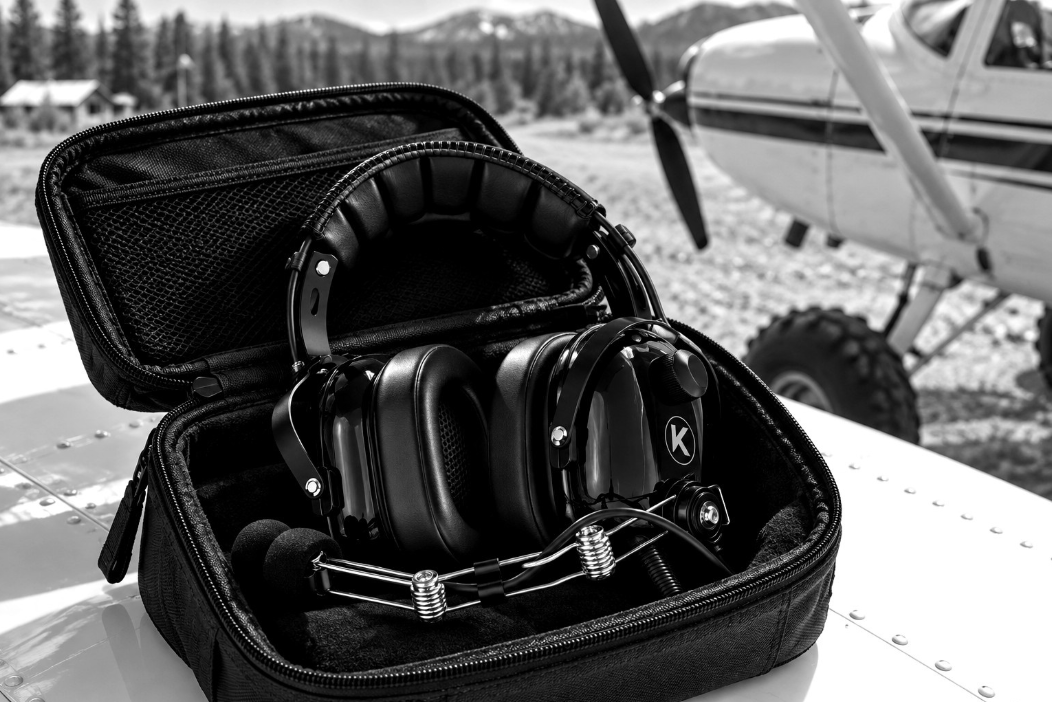
KORE Aviation - When you trade paved runways for gravel bars, grass strips, and mountain meadows, your equipment takes a severe beating. Selecting a backcountry aviation headset is entirely different from shopping for gear used in a pressurized cabin or a quiet flight school trainer. Tailwheel aircraft and STOL bush planes present unique challenges, ranging from intense engine vibration and unsealed cabins to remote operations where spare batteries and repair shops do not exist. If you fly an aircraft like a Super Cub or a tandem taildragger, standard avionics expectations get thrown out the window. You need gear built for raw environments, unyielding reliability, and maximum hearing protection when cabin noise pushes past safe limits.
Operating in the backcountry means your backcountry aviation headset is exposed to extreme temperatures, high density altitudes, and physical impacts from camping gear stored tightly in the baggage compartment. Understanding these unique demands ensures your communication links stay crystal clear when you are miles away from civilization.

Cockpit Acoustics in Tailwheel and Bush Planes: What Your Backcountry Aviation Headset Faces
Let us look at the numbers. In a standard aircraft like a Cessna 172, cabin noise hovers around 85 to 95 dB at cruise and spikes over 100 dB during run-up. Now step into a tailwheel bush plane with a high-horsepower engine, a metal prop, and minimal interior trim. Cabin noise levels in a working utility aircraft routinely register between 94 and 98 dB during cruise, and takeoff noise pushes even higher.
According to OSHA standards, safe exposure at 90 dB is capped at eight hours, but at 100 dB, your safe exposure limit drops to just fifteen minutes without proper attenuation. The FAA notes that pilots logging more than three hours per week face gradual hearing loss if their protection is inadequate.
In older vintage taildraggers, soundproofing is often virtually non-existent. Lightweight aluminum or fabric airframes amplify engine rumble and wind rush. When you add open windows or doors-off flying in the summer heat, aerodynamic buffeting creates a roaring wall of sound. To protect your hearing over long cross-country flights across remote terrain, you need a heavy-duty passive noise reduction system that physically blocks sound waves without relying on delicate internal circuits. If you need a refresher on noise attenuation principles, read What Is PNR for an Aviation Headset? A Simple Guide to Passive Noise Reduction in the Cockpit.
Why Tandem Seating Changes Everything for Intercom and Comm Audio
Most backcountry adventures happen in tandem seat taildraggers and STOL aircraft. Solo from the front seat or instructing a student from the rear, cockpit geometry dictates your equipment requirements. In a tandem arrangement, your passenger or instructor sits directly behind you. You cannot rely on visual cues or casual leaning; crystal-clear intercom communication is mandatory for safety during tight mountain maneuvers, canyon turns, and short-field landings.
Furthermore, tandem cockpits demand longer cables. A standard general aviation cable length might pull taut when routing around seat frames or shoulder harnesses in a cramped tube-and-fabric fuselage. A proper tailwheel headset must feature extra cable length and a sturdy clothing clip to anchor the cord securely to your shirt. This prevents the cable from snagging on fuel selectors, flap handles, or stick grips during aggressive control inputs.
When flying doors-open or windows-out in warm weather, wind gusts strike the microphone directly. A quality bush flying headset requires a noise-cancelling electret microphone equipped with a dense foam mic muff to cut out rushing slipstream noise so your transmissions remain crisp and intelligible to flight service stations and nearby traffic.
Dirt, Dust, and Remote Strips: Why Simplicity Wins
Backcountry flying means operating off unimproved surfaces. Landing on gravel bars and dirt strips kicks up fine silt, abrasive dust, and small stones that coat every surface inside the cockpit. Delicate electronic components do not survive long in this abrasive environment.
Active noise reduction headsets rely on complex circuitry, external control modules, and sensitive microphones powered by batteries. If your batteries die five miles deep into a remote mountain canyon, you lose your active noise cancellation, and some active units become completely unusable without power. Worse yet, remote airstrips do not stock AA or AAA batteries, and they certainly do not have avionics repair benches.
This is why veteran bush pilots heavily favor passive noise reduction gear. A pure passive design like the KORE KA-1 General Aviation Headset delivers a solid 24 dB PNR with zero batteries to die. It uses rugged mechanical engineering, thick silicone gel ear seals, and robust wiring designed to withstand years of abuse. If you are looking for a reliable passenger option for the back seat, the KORE P1 General Aviation Headset also provides 24 dB PNR in a bulletproof, mono-configured package.
Backcountry Aviation Headset Requirements at a Glance
| Backcountry Challenge | Why It Matters for a Headset | What to Look For |
|---|---|---|
| High Cabin Noise (94-98 dB) | Vintage fabric airframes and high-RPM props amplify sound, risking permanent hearing damage. | High passive noise reduction rating (minimum 24 dB PNR) with dense ear seals. |
| Tandem Seating Layout | Pilot and passenger sit in single-file, requiring absolute intercom clarity and extended cable routing. | Long, durable cables, clothing clips, and clear voice transmission. |
| Dust, Dirt, and Gravel Strips | Fine abrasive particles infiltrate the cockpit during every takeoff and landing, destroying fragile parts. | Replaceable mic muffs, washable cloth covers, and sealed mechanical parts. |
| Remote Strips and Zero Power Sources | Landing miles from civilization means no spare batteries or replacement electronics are available. | Battery-free passive design (PNR) that works reliably 100 percent of the time. |
| Outdoor Gear Storage and Camping | Equipment gets tossed into cargo areas, tents, and tail cones alongside camping gear. | Rugged frame construction, replaceable silicone gel ear seals, and a protective headset bag. |
Choosing the Best Backcountry Aviation Headset: KORE KA-1 and P1 Breakdown
When equipping yourself for serious bush flying, your main headset needs to handle punishing conditions while keeping your head comfortable across multiple short legs in high density altitudes. The KORE KA-1 General Aviation Headset stands as the premier choice for backcountry aviation. Backed by a 5-year warranty, it features switchable mono and stereo capability, a 3.5mm auxiliary input for audio devices or external aviation apps, and ultra-plush silicone gel ear seals that conform smoothly around glasses or sunglasses without creating pressure hotspots.
For the back seat passenger or instructor in your tandem taildragger, the KORE P1 General Aviation Headset offers exceptional value at $124.95. It matches the 24 dB PNR noise attenuation of its premium counterpart, ensuring your guest enjoys the same level of hearing protection without paying for features they do not need.
Protecting your gear on the road is just as critical as picking the right model. Tossing loose headsets into the back of a cargo area invites crushed mic booms and torn ear seals. Every KORE KA-1 ships with a dedicated carrying case, and you can add a KORE Pilot Headset Bag or a heavy-duty KORE Pilot Flight Bag to keep fine dust and gravel grit away from your communications gear when camping under the wing.
Backcountry Trip Checklist for Your Backcountry Aviation Headset and Gear
Before departing on a multi-day backcountry excursion, run through this specialized gear checklist to ensure your communication links remain unbroken far from home:
- Primary aviation headset with a robust frame and dual GA plugs.
- Backup passenger headset such as the KORE P1 General Aviation Headset for rear-seat occupants.
- Spare KORE Silicone Gel Ear Seals in case of accidental punctures from sharp gear.
- Washable KORE Cloth Ear Covers to manage sweat and dust accumulation during hot summer bush flights.
- Dedicated KORE Pilot Headset Bag or flight bag for secure cabin storage.
- Generic handheld aviation radio headset adapter for emergency communication redundancy.
Frequently Asked Questions
Why is passive noise reduction preferred for backcountry flying?
Passive noise reduction systems rely on mechanical acoustic blocking, thick ear seals, and sturdy earcups rather than electronic circuits. In remote areas without battery supply shops or repair benches, a battery-free passive design guarantees uninterrupted hearing protection.
What headset features matter most when flying a Super Cub or tandem taildragger?
Tandem seating requires extended cable routing, sturdy clothing clips to keep cords clear of flight controls, and a dependable intercom system to maintain clear communication between the front and rear seats.
How do I protect my headset from dust and gravel on dirt strips?
Operating off unpaved strips kicks up fine abrasive dust that settles into your gear. Storing your equipment inside a dedicated KORE Pilot Headset Bag and using washable cloth covers helps keep grit out of the microphone and speakers.
Can I wear glasses comfortably with the KORE KA-1 headset?
Yes. The silicone gel ear seals conform smoothly around eyewear temples, forming an airtight acoustic seal without digging into your head during long flights.
What is the warranty on KORE backcountry headsets?
The KORE KA-1 General Aviation Headset includes a comprehensive 5-year warranty, while the KORE P1 General Aviation Headset comes with a 1-year warranty.
Bottom Line
Backcountry flying puts different demands on your equipment than everyday general aviation. Between noisy tailwheel cabins, dusty landing strips, and remote locations, choosing the right backcountry aviation headset comes down to reliable communication, hearing protection, and durability. A good headset should handle these conditions without adding unnecessary complications to your flight.
For pilots who prefer a simple passive setup, the KORE Aviation KA-1 offers 24 dB passive noise reduction, comfortable gel ear seals, and a 5 year warranty for regular flying. The KORE Aviation P1 is another practical option for passengers or pilots looking for a more affordable headset.
Whether you are flying a Super Cub into a remote airstrip or exploring new backcountry destinations, dependable gear makes a difference. Explore KORE Aviation headsets to find the right setup for your next adventure.


